Fixing AMD 7800X3D YouTube Crashes
Note: I used Gemini when researching and solving the problem. However, I did not use AI to write this blog post. My voice is my own!
7800X3D and YouTube Instability
This is a quick post about troubleshooting AMD 7800X3D CPU crashes that occurred when watching YouTube, and YouTube only!
tl;dr: Try increasing the CPU VDDCR_SOC Voltage in the BIOS. I bumped it from default to 1.1v.
New PC
Some of my earliest PC builds used AMD CPUs (opterons, bartons, whateverons), but my last couple of PCs have used Intel & NVIDIA components.
My last PC was an Intel E8400 paired with an NVIDIA 1060 GTX (a workhorse!) which I stuck with for a long time due to the insanity of GPU pricing. It was rock-solid. I have had a few tempramental NVIDIA cards over the years, but nothing too bad.
I recently put together a new gaming PC with the following specs, and switched back to AMD:
| Type | Description |
|---|---|
| CPU | AMD Ryzen 7 7800X3D |
| CPU Cooler | Thermalright Phantom Spirit 120 SE |
| Motherboard | Gigabyte B650 PLUS |
| PSU | Corsair 850W ATX - RM850x |
| Memory | Silicon Power XPOWER Zenith Gaming 32 GB DDR5-6000 CL30 |
| HDD | Silicon Power UD90 2 TB M.2-2280 PCIe 4.0 X4 NVME |
| GPU | Sapphire PULSE Radeon RX 9060 XT 16 GB Video Card |
This is notable because it’s the first time I’ve run an AMD CPU since around the year 2010.
Aside: I got 50% off the PSU by buying an official Corsair refurb product and probably 30% off the CPU by buying OEM from eBay. There are bargains to be had, you just need to test them carefully. I tested the PSU in my old PC build to minimise the risk of frying my new components.
New PC, New Problems
Here’s where things get irritating! Gaming? Rock-solid. Prime 95? Rock-solid. Everything else? Rock-solid. Watching YouTube videos? Not so much.
When watching YouTube videos, the PC reset itself multiple times per week. Sometimes I’d go a day or two between resets, but not much longer. The screen would switch off momentarily, then it’d boot back into Windows. Grrr!
Gathering Information
Event Viewer showed a Kernel-Power event with Level: Critical.
The system has rebooted without cleanly shutting down first. This error could be caused if the system stopped responding, crashed, or lost power unexpectedly.
The interesting thing is that when under consistent load, the PC behaved itself and never once crashed or reset.
I wondered if perhaps there may be some tell-tale signs in logging information, so I installed HWiNFO for Windows which is a wonderful and lightweight hardware monitoring tool that can log an exhaustive list of metrics to a file.
I then captured a couple of crashes in the wild and graphed a bunch of metrics (temperatures, voltages, load values etc.) in the moments leading up to the crash. The problem is that it showed nothing of note. There was no smoking gun. Each crash seemed to show a spike in CPU usage a few seconds before the crash, then a reduction in load.
I originally did this by hand. I then fed the CSV file into Gemini 3 (I had a free month to mess with it) and asked it perform an analysis. I did not mention my own findings. It agreed with my analysis – going by the evidence, it was not a temperature or voltage issue.
OK, so … what now?
I googled Kagi around and also asked Gemini for suggestions, and it came up with some plausible ideas, but nothing worked.
I’d already tried the following:
- ❌ Updating the Motherboard BIOS (did this after building the system)
- ❌ Ensuring Precision Boost Overdrive (PBO) was disabled (it was)
Gemini also suggested the following, but it didn’t help:
- ❌ Change “Power Supply Idle Control” to “Typical Current Idle”
I searched around a bit more and found some new avenues, then returned to Gemini.
Eureka
The turning point was when I told Gemini that YouTube was always in the mix.
Me: The crash I described only happens when watching YouTube videos. Does that change your thinking on anything?
Gemini: This detail is extremely significant. The fact that it happens specifically during YouTube playback (a light, fluctuating workload) strongly reinforces the “Low-Load Instability” diagnosis, but it also points to a very specific culprit: Hardware Acceleration and the SoC.
Gemini then suggested making a bunch of software changes, such as:
- Disabling hardware acceleration in Firefox
- Disabling Multi-Plane Overview (MPO)
I thought these were pretty wide of the mark, as A) I have a GPU and intend to use it B) disabling MPO can affect FreeSync and other important functionality.
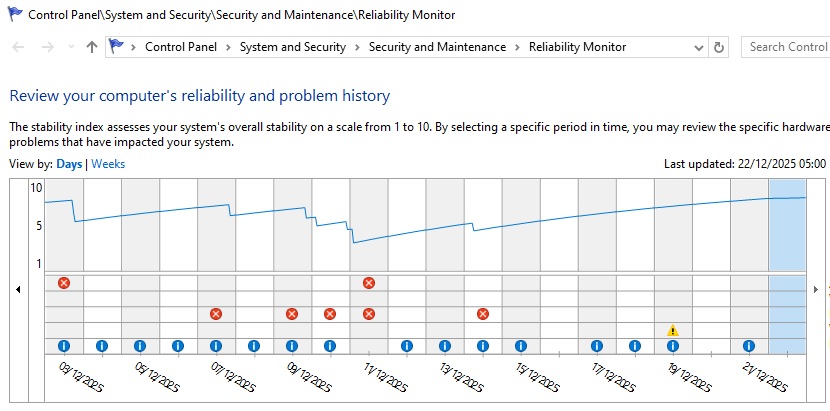
✅ Instead, I went with increasing the SoC voltage a notch, from 1.0v -> 1.1v.
The results were pretty much instant (also: the “View Reliability History” tool is super useful and I had no idea it was a thing):
 |
|---|
| No more crashes after the 15th |
Other Thoughts re: AMD/Intel/NVIDIA
I was not particularly impressed with my return to AMD CPU land! It was a pain in the arse, and a non-technical user would not figure this out – it would be an RMA.
Furthermore, AMD’s GPU software (Adrenaline) feels unimpressive and bloated. NVIDIA’s control panel has been a laggy POS for a decade+ at this point, but at least I don’t have to install the kitchen sink just to enable anti-lag mode and configure G-Sync.
No AMD, I don’t want your AI me-too chat bot in my GPU driver suite, thanks.